

-
×
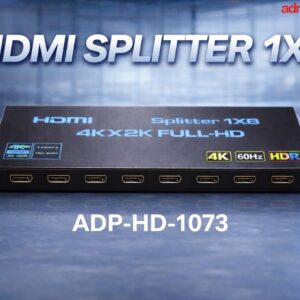 8 PORT HDMI SPLITTER 1 IN 8 OUT ,4K 2K 60 Hz (ADP-HS-1073)
1 × ₹6,300.00
8 PORT HDMI SPLITTER 1 IN 8 OUT ,4K 2K 60 Hz (ADP-HS-1073)
1 × ₹6,300.00
Subtotal: ₹6,300.00

8-to-1 Control: Connect and control up to 8 HDMI-enabled computers (or servers, NVRs, and consoles) using only one monitor, one USB keyboard, and one USB mouse.1
Surveillance: Monitoring 8 different NVR/DVR camera feeds on one high-res screen.
IR Remote Control.
Auto-Scan Mode
Plug-and-Play.
₹6,999.00 ₹8,000.00


The ADP-KS-1098 is an 8-port HDMI KVM (Keyboard, Video, Mouse) switch designed to centralize the management of up to eight computers using a single console (one monitor, one keyboard, and one mouse). It is commonly used in server rooms, data centers, and multi-system workstations to save space and hardware costs.
Capacity: Controls up to 8 computers or HDMI-enabled devices (like DVRs, NVRs, or gaming consoles) with one set of peripherals.
Resolution: Supports high-definition video up to 4K @ 60 Hz (3840 x 2160), ensuring crisp visual quality for modern monitors.
Switching Modes: Offers multiple ways to toggle between connected computers:
Front Panel Buttons: Manual push-buttons for each port.
IR Remote Control: Wireless switching from a distance.2
Desktop Controller: An external wired extension button for convenient desk placement.
Hotkeys: Keyboard sequences (e.g., [Scroll Lock] or [Ctrl]) to switch without moving your hands.
USB Peripheral Sharing: Features integrated USB ports (often USB 2.0) to share devices like printers, scanners, or flash drives across all connected PCs.
Compatibility: Plug-and-play operation; supports Windows, macOS, Linux, and Unix without needing software drivers.3
| Feature | Specification |
| Model | ADP-KS-1098 |
| Video Interface | HDMI 2.0 (compatible with HDCP 2.2) |
| Max Resolution | 3840 x 2160 @ 60Hz |
| Console Ports | 1x HDMI, 2x USB (KB/Mouse), 1x Audio (optional) |
| KVM Ports | 8x HDMI, 8x USB-B |
| Housing | Heavy-duty Metal |
| Power Supply | External DC Power Adapter (typically 5V or 12V) |
Computer Side: Connect each PC to the KVM using an HDMI cable for video and a USB-A to USB-B cable for data.
Console Side: Plug your main monitor into the “HDMI Out” port and your keyboard/mouse into the designated USB slots.
Power: Plug in the DC adapter to ensure stable switching, especially when using high-power USB peripherals.
EDID Emulation: This model typically features EDID storage, which helps maintain the correct resolution settings on your computers even when they are not the “active” selection.
Auto-Scan Mode: You can set the switch to automatically cycle through each computer at a set interval (e.g., every 5–10 seconds) for monitoring purposes.4
| brands | AD Net |
|---|
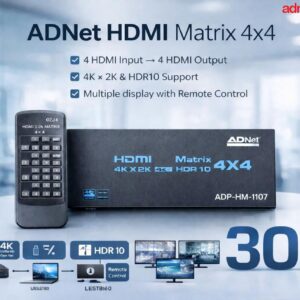
True Matrix Functionality: Routes any of the 4 HDMI inputs to any of the 4 HDMI outputs independently or simultaneously (Mirror or Matrix mode).
4K Ultra HD Support; (3840 x 2160) @ 30 Hz
High-Speed Bandwidth
HDR Compatible
Input Ports: 4 x HDMI Type A (Female).
Output Ports: 4 x HDMI Type A (Female).
Plug-and-Play
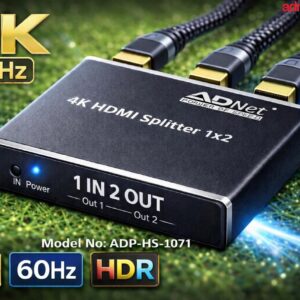
Dual Display Output: Distributes 1 HDMI input signal to 2 HDMI outputs (mirrored mode) simultaneously.
Ultra HD Resolution: Supports resolutions up to 4K x 2K @ 60Hz.
High Dynamic Range (HDR): Full support for HDR
HDCP Support
Advanced Audio.
Plug-and-Play
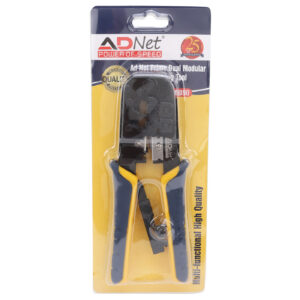
High quality tool for sharp cutting and precise crimping – This RJ45 crimping tool is engineered for accuracy, ensuring smooth cutting and reliable connections.
Build from high grade steel – Made from durable materials, this RJ45 connector crimping tool guarantees long-lasting performance.
Ideal for RJ45, RJ11, RJ12 and RJ22 modular plug – Perfect for networking and telephone setups, this RJ45 crimp tool set provides versatile compatibility.
✅ Soft plastic grip handle – Designed with a comfortable handle, this RJ45 crimping tool kit allows fatigue-free usage during longer tasks.
Widely Compatible – Works efficiently with 8P8C Ethernet and 6P4C, 6P6C, 6P4C, 6P2C telephone modular plugs, making it the best RJ45 crimping tool price value for professionals and DIY enthusiasts.
Product Code: AD-WR-390
Dual Display Output: Distributes 1 HDMI input signal to 8 HDMI outputs (mirrored mode) simultaneously.
Ultra HD Resolution: Supports resolutions up to 4K x 2K @ 60Hz.
High Dynamic Range (HDR): Full support for HDR
HDCP Support
Advanced Audio.
Plug-and-Play
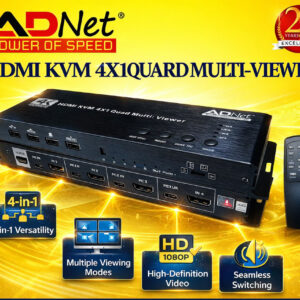
4-in-1 Versatility: Connect 4 HDMI input sources and output to 1 HDMI display.
Multiple Viewing Modes
High-Definition Video
Seamless Switching
Audio Management
Plug-and-Play


There are no reviews yet.